

Introduction
As applications grow, single-page React apps often need multiple views: dashboards, profiles, settings, or product pages. React Router is the industry-standard solution for handling client-side routing, enabling users to navigate seamlessly without page reloads. For a MERN Stack developer, understanding routing is vital for creating dynamic, user-friendly applications.
Curiosity Tech emphasizes building real-world MERN applications where routing is integrated from day one. This approach ensures learners not only understand theory but also implement multi-page flows that interact smoothly with backend APIs.
What is React Router?
React Router is a library that allows developers to define multiple routes in a React application and map them to specific components. Instead of traditional page reloads, React Router updates the UI dynamically, keeping state and performance intact.
Core Features:

Setting Up React Router
- Install React Router:
npm install react-router-dom
- Basic Configuration:
import { BrowserRouter as Router, Routes, Route } from ‘react-router-dom’;
import Home from ‘./pages/Home’;
import About from ‘./pages/About’;
function App() {
return (
<Router>
<Routes>
<Route path=”/” element={<Home />} />
<Route path=”/about” element={<About />} />
</Routes>
</Router>
);
}
export default App;
Hierarchical Diagram – React Routing Structure

This structure allows multiple views while maintaining a single-page application experience.
Dynamic Routes & Parameters
Dynamic routing allows pages to receive parameters in the URL, which is crucial for user-specific content:
<Route path=”/profile/:userId” element={<Profile />} />
Accessing userId in the component:
import { useParams } from ‘react-router-dom’;
const { userId } = useParams();
This enables rendering user-specific data fetched from backend APIs like Node.js and MongoDB.
Protected Routes for Authentication
MERN applications often require authentication. You can create protected routes to restrict access:
function ProtectedRoute({ children, isAuth }) {
return isAuth ? children : <Navigate to=”/login” />;
}
Use case: Only logged-in users can access dashboards or account settings.
Best Practices in Routing
- Nested Routing: Organize child components under parent routes for modularity.
- Lazy Loading Routes: Improve performance by loading components only when needed.
- Centralized Route Config: Maintain a route configuration file for scalability.
- Error Handling: Use * path to show a 404 Not Found page.
Table – Routing Methods Comparison:
| Routing Type | Use Case | Advantages |
| Static Routing | Fixed pages (Home, About) | Simple, straightforward |
| Dynamic Routing | User profiles, blog posts | Flexible, parameter-driven |
| Nested Routing | Admin dashboards, submenus | Modular, maintainable |
| Protected Routing | Authentication-based pages | Security, role-based access control |
How to Become an Expert in React Routing

- Practice Nested Routes: Build dashboards with multiple nested pages.
- Implement Dynamic Routes: Create user profiles and detail pages dynamically.
- Integrate with Backend: Fetch data based on URL parameters from Node.js and MongoDB APIs.
- Use Advanced Features: Explore route transitions, animations, and lazy loading.
- Debug Routing Issues: Understand browser history, redirects, and route matching intricacies.
Curiosity Tech provides advanced MERN projects where learners implement routing with authentication, dynamic parameters, and nested layouts, bridging the gap between theoretical knowledge and production-level development.
Infographic Suggestion
Title: “Navigating a MERN App with React Router”
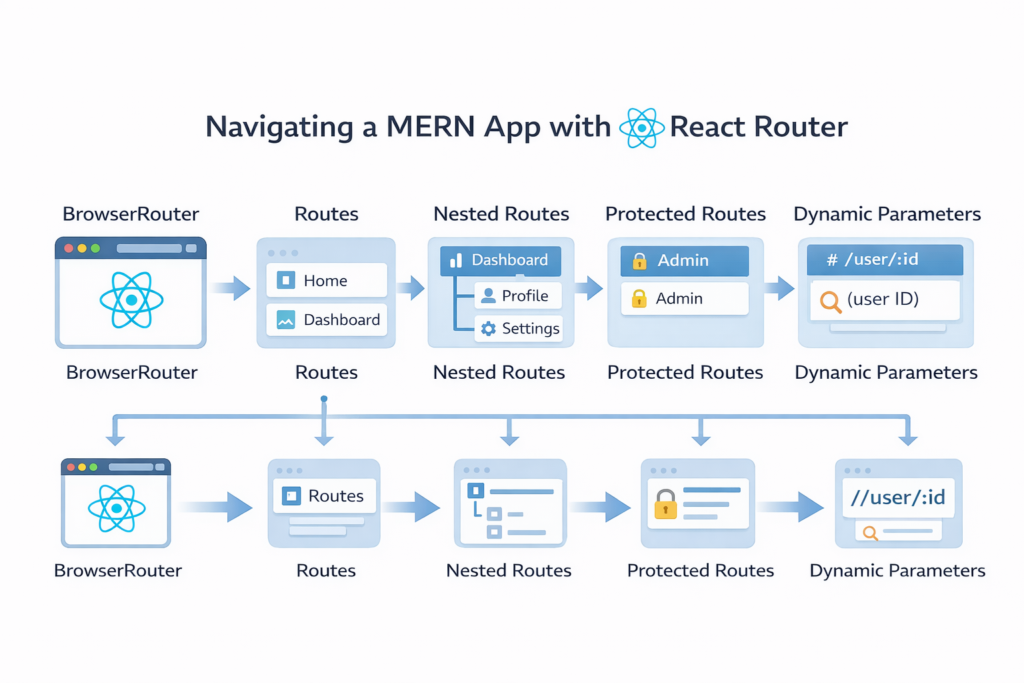
- Sections: BrowserRouter → Routes → Nested Routes → Protected Routes → Dynamic Parameters
Conclusion
Routing is the backbone of any scalable React application. Mastering React Router ensures smooth navigation, dynamic content rendering, and a professional-grade user experience in MERN Stack projects. Combining this knowledge with hands-on practice and guided projects at Curiosity Tech equips developers with the expertise to build complex, production-ready applications efficiently.