

Introduction
Data is the most valuable asset for any company, but it’s also the hardest to move. Unlike apps that don’t store data, data is large, hard to move, and often regulated.
Migrating data across AWS, Azure, and GCP is rarely about just copying files — it’s about:
- Integrity: No data loss or corruption.
- Consistency: Apps keep running without downtime.
- Compliance: Following data laws in different countries.
- Cost-efficiency: Avoiding high transfer fees.
AtCuriosity Tech, we’ve seen companies in Nagpur and beyond face these challenges—and how having a clear plan makes moving data easier.
1 – Why Data Migration Across Clouds?
- Avoid vendor lock-in: Don’t get stuck using only one cloud provider.
- Best-of-breed services → Use BigQuery (GCP) + S3 (AWS) + Synapse (Azure).
- Disaster recovery: Keep backup copies of data on different clouds.
- Global expansion: Move data across clouds to follow local data laws.
2 – Data Migration Challenges
- Volume → TBs to PBs can take weeks.
- Egress costs → AWS to GCP data transfer = $$$.
- Downtime risk → Applications depending on DBs may break.
- Schema differences → SQL dialects differ (e.g., BigQuery vs PostgreSQL).
- Security → Encryption, IAM roles across providers.
3 – Step-by-Step Migration Playbook
1 – Assessment & Planning
- Inventory data → Structured (SQL, NoSQL) + Unstructured (files, images).
- Classify criticality → mission-critical, archival, backup.
- Choose migration strategy → big bang vs phased.
Tools to help: AWS Migration Evaluator, Azure Migrate, GCP StratoZone.
2 – Architecture Design
- Choose migration tools (see Section 4).
- Plan for hybrid connectivity → VPN, Direct Connect, ExpressRoute, Interconnect.
- Design cutover strategy → minimal downtime vs full downtime window.
3 – Pilot Migration
- Move a small dataset first.
- Validate integrity + latency.
- Measure bandwidth utilization.
4 – Execution
- Migrate all data.
- Run both systems in parallel — apps write to both the old and new databases for a while.
- Sync only the changes (called deltas) that happen during the transition.
5 – Validation & Cutover
- Verify data accuracy by comparing checksums on both sides.
- Validate application connectivity.
- Switch traffic to new provider.
At CuriosityTech labs, students practice this by moving a dataset from AWS RDS → GCP Cloud SQL while maintaining uptime.
Section 4 – Tools for Multi-Cloud Data Migration
| Source | Target | Tool/Method |
| AWS S3 | Azure Blob | AzCopy, AWS DataSync |
| AWS S3 | GCP GCS | Storage Transfer Service, Rclone |
| Azure Blob | GCP GCS | Google Transfer Appliance, AzCopy + GCS Fuse |
| RDS (MySQL/Postgres) | Cloud SQL | DMS (AWS Database Migration Service), Striim |
| BigQuery | Synapse | Data Factory, BigQuery Export to GCS → Blob |
Many organizations use third-party tools (Fivetran, Talend, Informatica) when migrations involve complex ETL.
Section 5 – Infographic Blueprint (Described)
Picture a multi-cloud data migration pipeline:
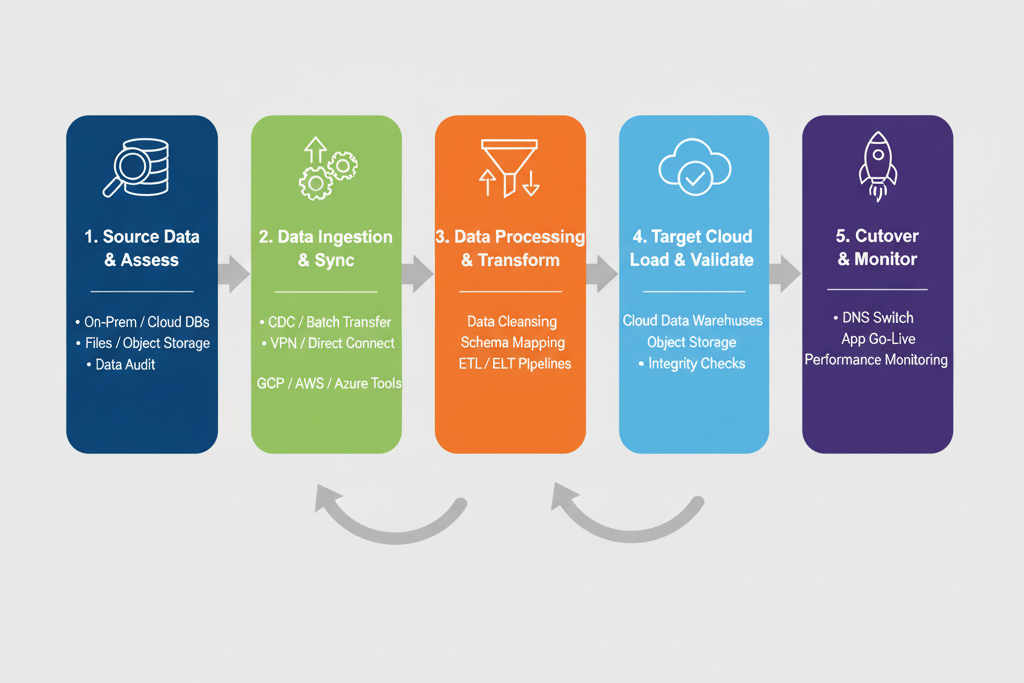
- Right box: Azure Blob + Synapse Analytics
- Left box: AWS S3 (source buckets).
- Arrows: DataSync → GCS bucket.
- Middle box: Transformation layer (ETL service)
This plan highlights that migration isn’t just about moving data — it usually involves transferring, transforming, and loading the data.
Section 6 – Security & Compliance Checklist
- Encryption at rest + in transit (KMS, Customer-managed keys).
- Access logs → enable CloudTrail (AWS), Monitor (Azure), Cloud Audit Logs (GCP).
- Data residency laws → GDPR, HIPAA, RBI compliance in India.
- IAM mapping → AWS IAM Roles ≠ Azure AD ≠ GCP IAM → must be redefined.
At CuriosityTech.in, learners practice real situations, like moving healthcare data between GCP and Azure while following HIPAA rules.
Section 7 – Cost Optimization Strategies
- Use offline appliances (AWS Snowball, GCP Transfer Appliance, Azure Data Box) for PB-scale migrations.
- Compress + deduplicate before transfer.
- Take advantage of free ingress → most clouds charge for outbound traffic, not inbound.
- Plan phased migrations to spread cost
Section 8 – Becoming an Expert in Data Migration
Mastery comes by:
- Understanding network backbones (Direct Connect, Interconnect, ExpressRoute).
- Practicing schema conversions across SQL/NoSQL systems.
- Running pilot migrations under time pressure.
- Designing disaster recovery fallback plans
At CuriosityTech Nagpur, students do final projects like moving unstructured data from AWS S3 to Azure Blob and then running queries on it using Synapse.
Conclusion
Data migration isn’t just a one-time task — it’s a continuous skill needed for using multiple clouds.
With a good plan that includes assessing, designing, testing, doing, and checking, companies can move data between AWS, Azure, and GCP confidently, safely, and cost-effectively.
At Curiosity Tech, we teach engineers to see migration not as a problem, but as a key part of building strong multi-cloud systems.