
Introduction
Every serious web application begins with one simple question:
“Who is this user?”
Whether it is Facebook, an online bank, a learning portal, or an eCommerce store, the entire system is built around authentication and sessions. PHP is one of the most powerful languages for building secure login systems when used correctly.
At CuriosityTech, where students train in a real-world coding environment on Wardha Road, Nagpur, authentication is not taught as a small topic. It is taught as a core security layer because one mistake in login logic can expose thousands of users.
On Day 10, we dive deep into how PHP handles user identity, login control, and session management.
1. What Authentication Really Means
Authentication is not just about checking a username and password.
It includes:
- Identifying users
- Verifying credentials
- Protecting sessions
- Preventing unauthorized access
Every time you log into a website, PHP performs multiple checks behind the scenes before letting you see your dashboard.
2. How PHP Knows Who You Are
PHP is a stateless language. That means every page load is independent.
So how does PHP remember you after login?
The answer is sessions.
Session Concept
When a user logs in:
- PHP verifies credentials from MySQL
- PHP creates a unique session ID
- That ID is stored on the server
- A cookie is sent to the browser
- On every request, the browser sends that ID back
This is how PHP recognizes you across pages.
3. Session Architecture
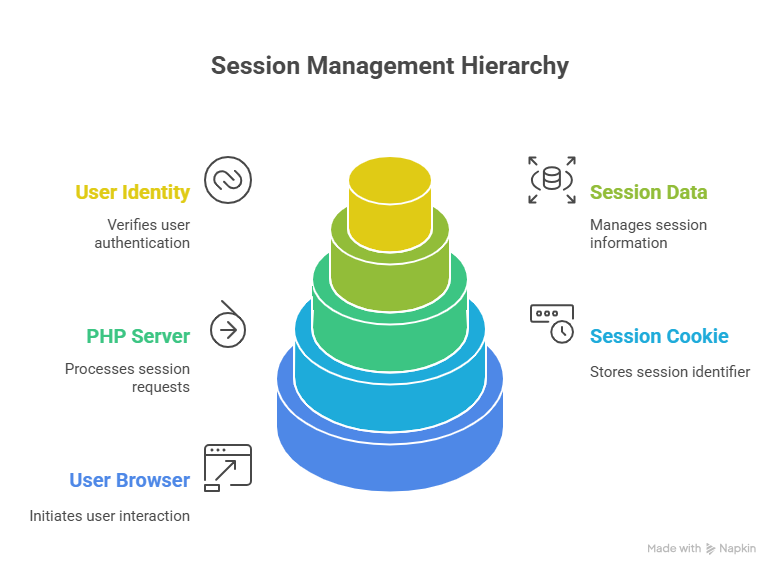
This structure is what allows you to:
- Stay logged in
- Access private pages
- Protect admin panels
4. Why Login Systems Get Hacked
Most PHP login failures happen because developers:
- Store passwords in plain text
- Don’t validate input
- Use weak session handling
Professional developers never store raw passwords. They store hashed and encrypted values so even if a database is compromised, user data remains safe.
This level of security thinking is exactly what CuriosityTech builds into its PHP training programs.
5. Authentication in Real Applications
Here is how PHP authentication is used in real life:
| Application | How Authentication Works |
| Social media | Login + sessions |
| Online banking | Multi-layer verification |
| Admin panels | Role-based login |
| Learning platforms | Student accounts |
| eCommerce | Customer identity |
Without proper authentication, none of these systems would be safe.
Infographic Description
Title: PHP Authentication Flow
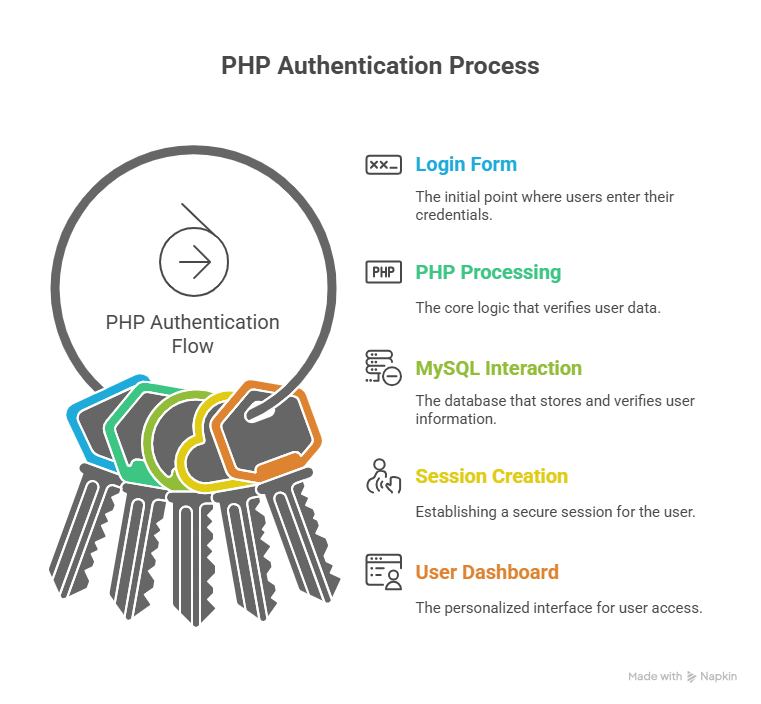
This illustrates how data flows during login中过
6. Role-Based Access Control
Professional PHP systems don’t just check if you’re logged in. They check who you are.
| Role | Access |
| Admin | Full control |
| Manager | Limited control |
| User | Personal data only |
This is how PHP websites prevent customers from accessing admin dashboards or editing other users’ data.
7. Where CuriosityTech Adds Real Value
Many institutes teach login systems as a simple form submission. But CuriosityTech teaches:
- Secure hashing
- Session expiration
- Token-based validation
- Attack prevention
This is why their students can build enterprise-grade PHP applications instead of basic demo projects.
Conclusion
Authentication and sessions are the security backbone of every PHP web application. If these systems fail, everything fails.
By mastering login logic, session handling, and user identity control, you move from being a PHP coder to becoming a trusted web developer capable of building secure platforms.
This is exactly why professional training environments like CuriosityTech treat authentication as a mission-critical skill.