
DevOps practices are no longer limited to backend or enterprise systems—they are essential for mobile and web application development. Integrating DevOps pipelines, CI/CD, automated testing, monitoring, and feedback loops into mobile and web projects ensures faster releases, higher quality, and better user experiences.
At Curiosity Tech, we teach engineers to implement end-to-end DevOps workflows for mobile and web applications, blending automation, testing, and monitoring to achieve reliability and scalability.
Why DevOps for Mobile & Web Applications?
| Challenge in App Development | DevOps Solution |
| Long Release Cycles | CI/CD pipelines enable daily or multiple deployments per week |
| Frequent Bugs & Regression | Automated unit, integration, and UI testing |
| Platform Fragmentation | Containerization, version control, and automated builds for multiple environments |
| Slow Feedback Loops | Continuous monitoring and user analytics integration |
| App Store Deployment Delays | Automated pipelines streamline builds, signing, and distribution |
DevOps transforms mobile/web development into a continuous feedback-driven process, reducing downtime and improving user satisfaction
Core Components of DevOps for Mobile & Web
- Version Control System (VCS) :- Tools like Git, GitHub, GitLab, and Bitbucket help manage code changes and collaborate with teams.
- Continuous Integration (CI) :- Tools like Jenkins, GitLab CI, CircleCI, and Bitrise automatically test and build code whenever changes are made.
- Continuous Delivery/Deployment (CD) :- Automates the process of building, testing, and releasing apps, so updates can go live faster and more safely.
- Automated Testing :- Runs different types of tests (unit, integration, UI) using tools like Selenium, Appium, and Espresso to ensure code quality.
- Artifact Management :- Tools like Nexus and Artifactory store and manage build files, packages, and binaries.
- Configuration Management :- Tools like Docker, Ansible, Chef, and Puppet help keep environments consistent across development, testing, and production.
- Monitoring & Feedback :- Tools like Prometheus, Grafana, Firebase Crashlytics, and Sentry monitor app performance and catch errors in web and mobile apps.
- Cloud Services & Hosting :- Platforms like AWS, Azure, and GCP provide cloud hosting, storage, and scalable infrastructure for applications.
Mobile & Web DevOps Workflow Diagram
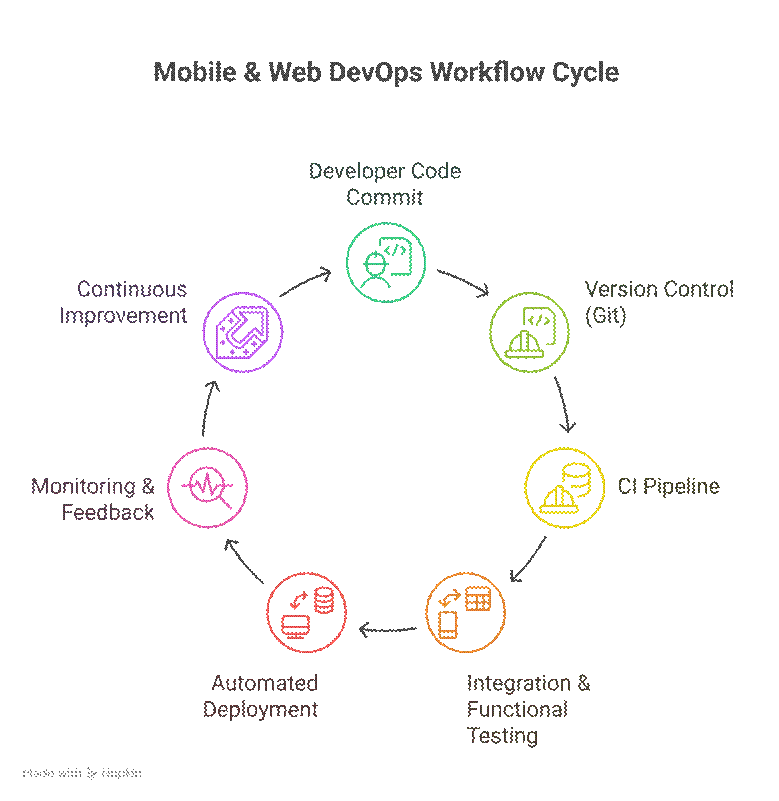
Explanation: This workflow enables faster releases, automated quality checks, and real-time monitoring, creating a continuous feedback loop for improvements
Technology Stack for Mobile & Web DevOps
| Layer | Mobile | Web |
| Version Control | GitHub, GitLab | GitHub, GitLab, Bitbucket |
| CI/CD | Jenkins, CircleCI, Bitrise | Jenkins, GitLab CI, GitHub Actions |
| Containerization | Docker for backend APIs | Docker/Kubernetes |
| Configuration Management | Ansible, Chef | Ansible, Puppet |
| Testing | Espresso, Appium, JUnit | Selenium, Cypress, Jest |
| Monitoring | Firebase Crashlytics, Sentry | Prometheus, Grafana, New Relic |
| Deployment | Play Store, App Store | Cloud Hosting: AWS, GCP, Azure |
At CuriosityTech, learners implement multi-platform pipelines ensuring consistent app builds, automated tests, and scalable deployment environments
Best Practices for Mobile & Web DevOps
| Practice | Explanation |
| Automate Everything | Build, test, and deploy automatically for all platforms |
| Environment Parity | Use Docker/Kubernetes to mimic production in dev/test |
| Static Code Analysis | Integrate tools like SonarQube to detect bugs and vulnerabilities early |
| Feedback Integration | Monitor crash reports and user analytics for continuous improvement |
| Feature Toggles | Enable/disable features without redeploying to reduce risk |
| Security Integration (DevSecOps) | Scan dependencies and secrets to prevent leaks in CI/CD |
Practical Use Case: Mobile App Deployment
- Development :- Developers push code to a GitHub repository.
- CI Pipeline :- CircleCI runs unit test , UI tests (Appium/Espresso) and builds the APK / IPA .
- Artifact Storage :- Nexus repository stores signed app binaries.
- CD Pipeline :- Automated deployment to Play Store and App Store beta channels using Fastlane.
- Monitoring :- Firebase Crashlytics tracks app crashes, while Grafana dashboards track backend API performance.
- Iteration :- Feedback from monitoring and analytics inform next sprint.
Challenges & Solutions
| Challenge | Solution |
| Multiple Platforms & Devices | Use emulators, simulators, and automated cross-platform testing |
| App Store Delays | Automate builds and signing with tools like Fastlane |
| Environment Drift | Use containerized environments and IaC for parity |
| Monitoring Multiple Components | Integrate mobile crash reporting and web server monitoring into a unified dashboard |
| Security Risks | Implement DevSecOps pipelines and encrypt sensitive data |
Conclusion
DevOps for mobile and web applications enables rapid, reliable, and secure software delivery. By integrating CI/CD pipelines, automated testing, containerization, monitoring, and cloud services, teams can accelerate releases, reduce bugs, and maintain high availability.
At Curiosity Tech, learners gain hands-on experience with full mobile and web DevOps pipelines, applying automation, monitoring, and best practices to real-world projects. This prepares engineers to deliver scalable and resilient applications across platforms.