
Introduction
Version control is a critical skill for FullStack .NET developers. Git, combined with GitHub, allows teams to collaborate efficiently, track code changes, and maintain a clean project history.
At Curiosity Tech, learners gain hands-on experience using Git & GitHub for .NET projects, learning branching, pull requests, collaboration, and CI/CD integration.
1. Why Git & GitHub Matter
| Feature | Benefit |
| Version Control | Track code changes over time |
| Collaboration | Multiple developers can work together |
| Branching | Develop features independently without affecting main codebase |
| Pull Requests | Review code before merging |
| Integration | Connect with CI/CD pipelines for automation |
Diagram: Git Workflow
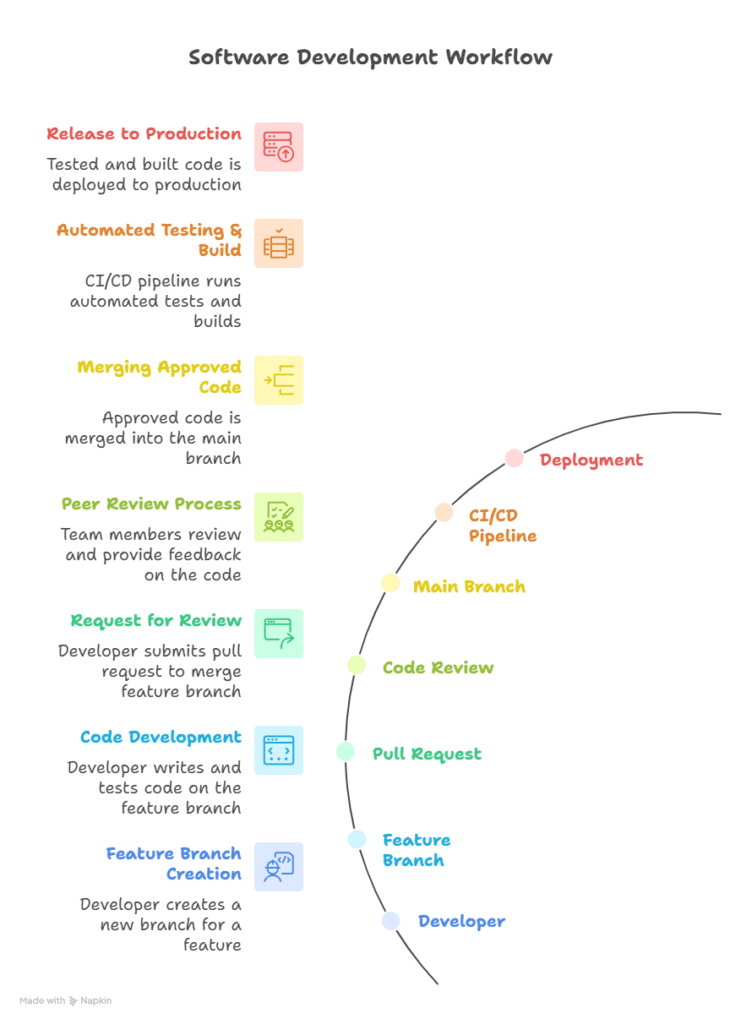
Learn Git and GitHub best practices for .NET developers. Manage repositories, use branching strategies, and improve version control in .NET projects.
2. Setting Up Git for .NET Projects
cd YourProjectFolder
git init
git add .
git commit -m “Initial commit”
Connect to GitHub Repository:
Install Git:
git –version
Initialize Git in Project:
git remote add origin https://github.com/username/repo.git
git push -u origin main
3. Branching Strategies
Common Strategies for .NET Projects:
| Strategy | Description |
| Feature Branch | Develop new features in isolated branches |
| Develop Branch | Aggregate all features before production |
| Main/Master Branch | Stable production-ready code |
| Hotfix Branch | Emergency bug fixes directly from main |
Example Commands:
git checkout -b feature/job-portal-auth
git add . git commit -m “Add JWT authentication”
git push origin feature/job-portal-auth
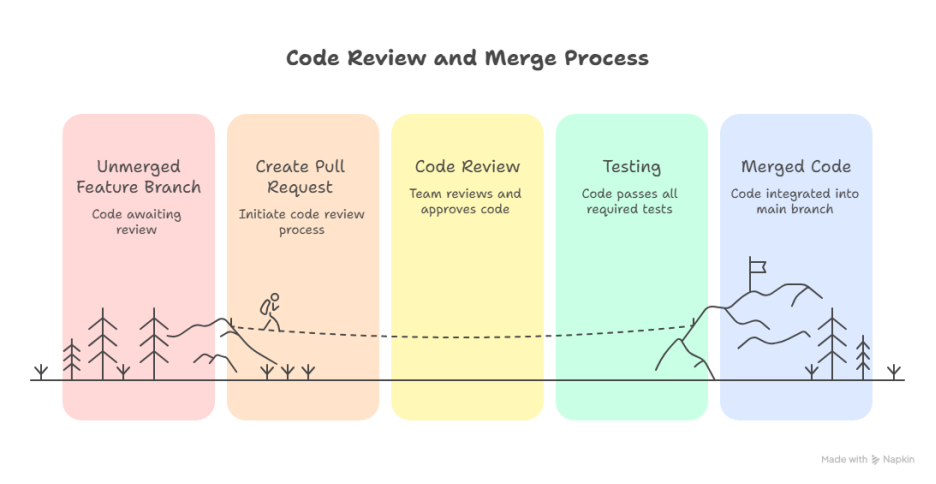
4. Pull Requests & Code Review
- Create pull request from feature branch to develop or main
- Team members review code, suggest improvements, or approve
- Merge only after passing tests and approvals
Pull Request Workflow Diagram:
5. Collaboration & Conflict Resolution
Common Commands:
# Fetch latest changes
git fetch
# Merge updates from main to your branch
git merge origin/main
# Resolve conflicts manually, then commit
git add .
git commit -m “Resolve merge conflicts”
Tips:
- Pull latest changes before starting new work
- Use meaningful commit messages
- Review conflicts carefully to avoid overwriting important code
6. Real-World Project: CuriosityTech Job Portal
- Scenario: Multiple developers working on Job Portal
- Implementation:
- Feature branches for frontend, backend, and database
- Pull requests for review and merge
- CI/CD pipeline integrated with Azure DevOps to deploy successful merges
- Benefits:
- Track all changes efficiently
- Maintain clean project history
- Ensure high-quality, production-ready code
7. Best Practices
- Commit small, logical changes frequently
- Use branch naming conventions: feature/login, bugfix/fix-auth
- Protect main branch with branch policies
- Enable CI/CD checks before merging
- Document workflows for team consistency
8. Curiosity Tech Mentorship Insights
- Learn professional Git workflows for FullStack .NET projects
- Hands-on practice with branching, pull requests, code review, and CI/CD integration
- Prepares learners for collaborative enterprise development environments
Conclusion
Mastering Git & GitHub is essential for FullStack .NET developers. Proper version control and collaboration practices ensure clean, maintainable code, smooth teamwork, and seamless CI/CD integration. At Curiosity Tech, learners gain practical experience applying these principles to real-world projects.
The next step is Day 24 – Latest .NET Full Stack Development Trends in 2025, exploring emerging technologies, frameworks, and practices.