
In the ever-evolving landscape of software development, managing code effectively is as critical as writing it. By Day 4 of our immersive learning journey, we delve into Version Control with Git and GitHub, the backbone of modern collaborative development. Whether you are a budding developer, an experienced coder, or someone looking to streamline your project management, understanding Git is non-negotiable.
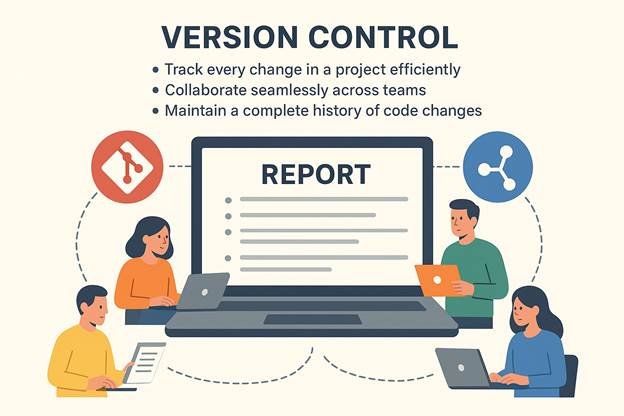
What is Version Control?
Git vs GitHub: Understanding the Difference
It’s common to confuse Git with GitHub, but they serve different purposes:
| Aspect | Git | GitHub |
| Type | Version Control System | Cloud-based Git repository hosting service |
| Purpose | Tracks changes locally | Enables collaboration, remote backups, pull requests |
| Usage | Command-line interface or GUI | Web interface and Git CLI integration |
| Collaboration | Local branches, merges | Global sharing, team contributions, issues, pull requests |
Git is your local tool, while GitHub adds a social, collaborative layer to your workflow.
Setting Up Git: A Step-by-Step Guide
Getting started with Git is surprisingly simple. Here’s a practical approach:
- Install Git:
Visit git-scm.com and install Git for your OS.
Configure Git:
Set up your identity for commits:
git config –global user.name “Your Name”
git config –global user.email “you@example.com”
- Initialize a Repository:
Navigate to your project folder and run:
git init
- Track Changes:
git add .
git commit -m “Initial commit”
- Connect to GitHub:
Create a repository on GitHub and link your local repo:
git remote add origin https://github.com/username/repo.git
git push -u origin main
- Once connected, pushing, pulling, and collaborating becomes a breeze.
Understanding Git Workflows
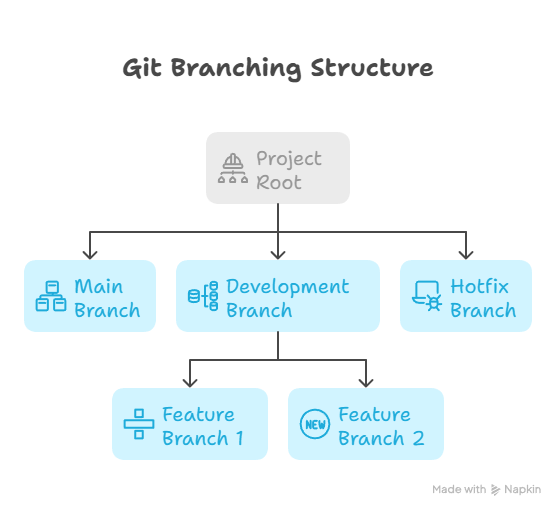
Effective version control isn’t just about tracking changes—it’s about managing collaboration. Here’s a hierarchical view of a common Git workflow:
Project Root:
Workflow Description:
- Main Branch: Holds production-ready code.
- Development Branch: Consolidates new features for testing.
- Feature Branches: Dedicated branches for individual features.
- Hotfix Branch: Allows urgent fixes without affecting ongoing development.
Using this branching strategy ensures a clean, conflict-free development environment, which is crucial for teams.
Collaboration with GitHub
GitHub doesn’t just host code; it transforms how teams work:-
- Pull Requests: Propose changes and discuss them before merging.
- Issues: Track bugs, enhancements, or project tasks.
- Actions: Automate workflows like CI/CD pipelines.
- Project Boards: Manage tasks visually, akin to a Kanban board.
For beginners, exploring forks and clones allows experimenting with repositories without impacting the main project—a safe sandbox for learning.
Real-World Application
Imagine a tech startup managing multiple projects simultaneously. Without Git and GitHub, coordinating updates between teams, ensuring code quality, and maintaining version history would be nearly impossible. By implementing Git workflows and leveraging GitHub’s collaboration features, teams can:
- Minimize code conflicts.
- Track every contribution.
- Ensure faster deployment cycles.
At Curiosity Tech, we emphasize such modern practices, helping learners and professionals alike adopt best-in-class tools for efficient development. Our platform, curiosity tech, provides curated tutorials and hands-on exercises that reinforce real-world applications of Git and GitHub, ensuring learners build strong foundational skills while staying aligned with industry standards.
Infographic: Git & GitHub Workflow
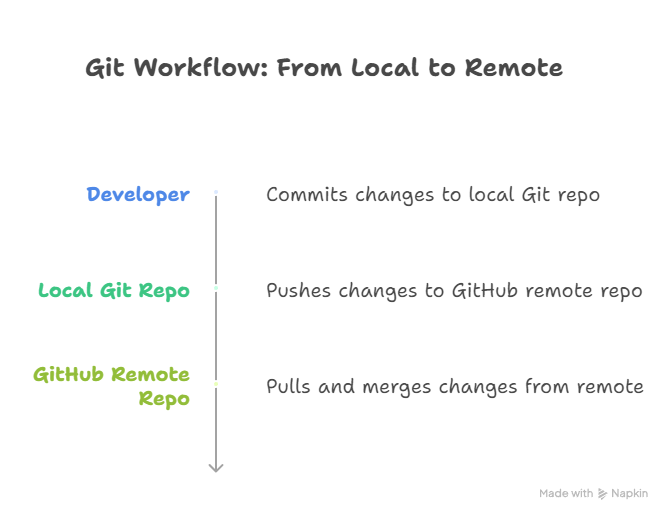
Description: This simple diagram illustrates how developers interact with local Git repositories and synchronize changes with remote repositories on GitHub, enabling seamless collaboration across teams.
Conclusion
Version control is no longer optional; it’s a fundamental skill for every developer. Git and GitHub provide the tools, workflows, and platforms to manage projects efficiently, collaborate effectively, and maintain robust version histories. By mastering Git today, you ensure smoother teamwork and a professional approach to software development tomorrow.
At Curiosity Tech, we merge theory with practice, offering learners the chance to experience hands-on Git exercises, real-world scenarios, and community-driven learning. If you’re eager to elevate your development skills, understanding Git and GitHub is your stepping stone.