
Introduction
A mobile app without data is just a shell. Real applications store user profiles, messages, tasks, photos, preferences, and activity logs. All of this information must be saved, retrieved, synchronized, and protected. That is the role of databases.
In cross-platform mobile development, developers usually work with three powerful data systems: SQLite for local storage, Firebase for real-time cloud data, and MongoDB for large scalable backends.
At CuriosityTech, learners are taught not just how to connect a database, but how to choose the right one based on performance, security, and business requirements.
Day 12 focuses on turning a mobile app into a living system that remembers, learns, and grows.
Understanding the three database layers
Modern mobile apps use more than one type of database. They combine local and cloud storage to give users speed and reliability.
SQLite is a lightweight database stored directly on the device. It is used for offline access, caching, and storing user settings. When internet connectivity is weak or unavailable, SQLite keeps the app running smoothly.
Firebase is a cloud-based database that provides real-time synchronization. When one user updates data, everyone sees the change instantly. This makes it ideal for chat apps, collaboration tools, and live dashboards.
MongoDB is a backend database that stores large structured data sets. It is used for user accounts, transactions, and long-term records. MongoDB connects to mobile apps through APIs built with Node or other backend frameworks.
Table comparing database roles
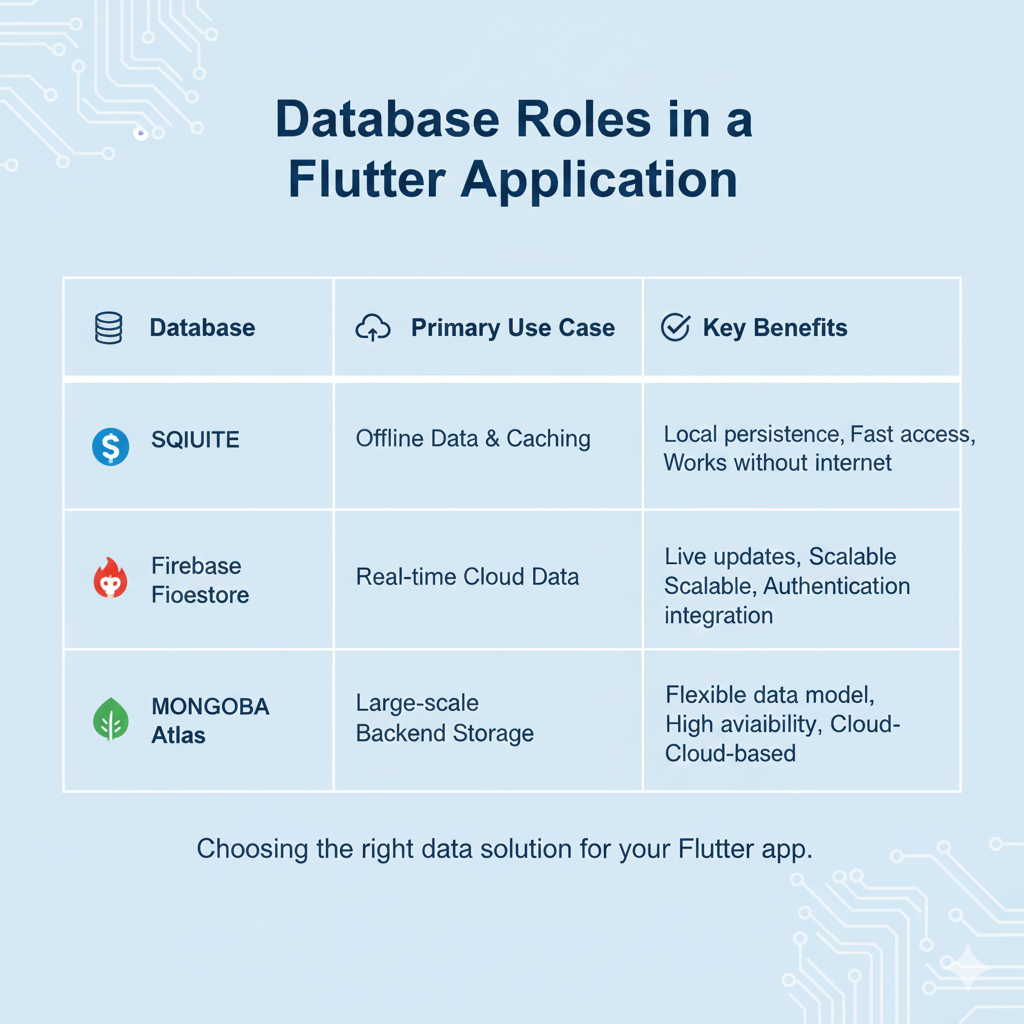
Together they create a powerful data ecosystem.
How data flows in a mobile app

This flow allows mobile apps to be fast, reliable, and scalable.
Hierarchical view of database architecture

This structure ensures both speed and long-term data integrity.
Infographic description

This shows how data moves from the device to the cloud and back.
How developers master database integration
Professional developers learn how to structure data, manage synchronization conflicts, secure user information, and optimize queries. They also learn how to design databases that grow with the app.
At CuriosityTech, students build real apps that use all three systems, preparing them for enterprise-level mobile development.
Conclusion
Database integration transforms a mobile app from a simple interface into a powerful data-driven platform. By understanding SQLite, Firebase, and MongoDB, developers can build apps that work offline, sync online, and scale globally.
Day 12 gives mobile developers the power to handle real-world data.

