On Day 21, we explore AWS SageMaker, the fully managed service for building, training, and deploying machine learning models at scale.
At CuriosityTech.in, learners understand that AI/ML is no longer optional—modern cloud engineers must integrate ML capabilities into applications for smarter solutions. SageMaker simplifies this by handling infrastructure, scaling, and monitoring, allowing engineers to focus on model development and deployment.
1. What is AWS SageMaker?
AWS SageMaker is a comprehensive platform for ML lifecycle management, including:
- Data preparation (processing, cleaning, and labeling)
- Model building (training using built-in algorithms or custom code)
- Model deployment (real-time or batch inference)
- Monitoring and optimization (track performance and retrain models)
Key Benefits:
- Fully managed infrastructure → no need to manage servers
- Supports Jupyter notebooks for interactive development
- Integrated with S3, IAM, CloudWatch, and Lambda
- Auto-scaling endpoints → cost-effective model serving
CuriosityTech.in Insight: Beginners often focus solely on model building. SageMaker emphasizes end-to-end workflow management, making it easier to deploy ML in production-ready environments.
2. SageMaker Architecture Diagram
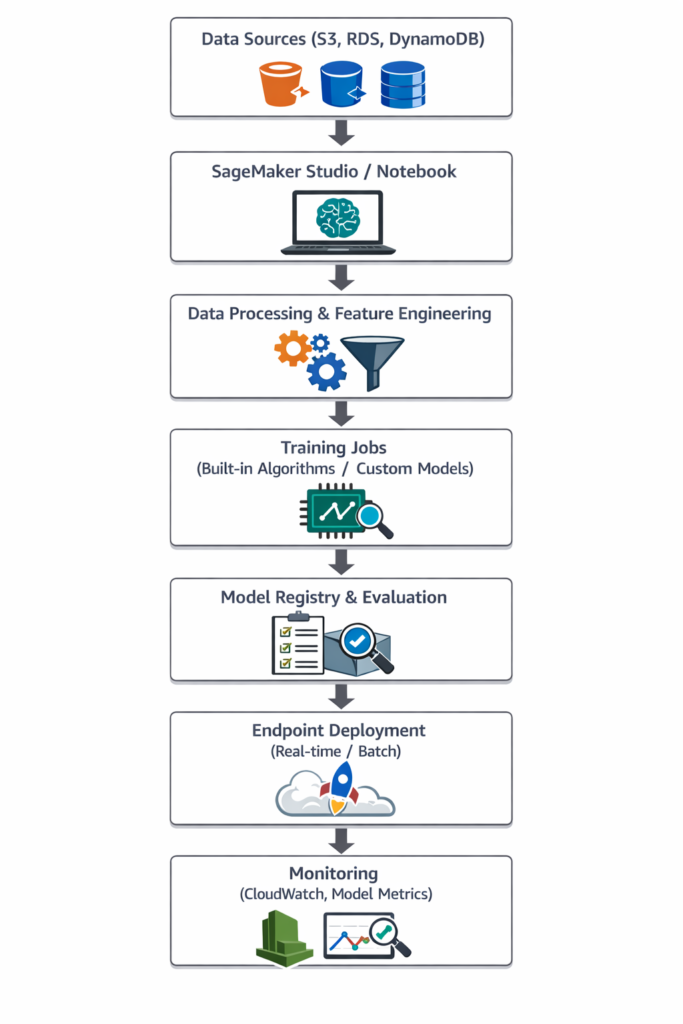
Explanation:
- Data Sources: Collect and store raw data in S3 or databases
- Notebook & Studio: Interactive development environment
- Training Jobs: Leverage GPU/CPU resources managed by AWS
- Deployment: Endpoint for inference
- Monitoring: Track accuracy, latency, and usage
3. Core Components of SageMaker
| Component | Description | Use Case |
| SageMaker Studio | IDE for ML development | Interactive model building |
| Notebooks | Jupyter-based environment | Data exploration & feature engineering |
| Training Jobs | Managed compute for model training | Auto-scale resources |
| Built-in Algorithms | Pre-packaged ML algorithms | Linear regression, XGBoost, K-Means |
| Hyperparameter Tuning | Automated tuning | Optimize model performance |
| Model Registry | Version control for models | Track and manage model lifecycle |
| Endpoints | Real-time inference | Deploy models for predictions |
| Batch Transform | Batch predictions | Large-scale offline predictions |
4. Step-by-Step Lab: Deploying a Machine Learning Model
1 – Prepare Dataset
- Example: Customer churn dataset in CSV format on S3
- Use SageMaker Data Wrangler for cleaning and feature engineering
2 – Create SageMaker Notebook
- Launch SageMaker Studio
- Open Jupyter Notebook → connect to dataset on S3
- Perform EDA (Exploratory Data Analysis) using pandas and matplotlib
3 – Train Model
- Select built-in XGBoost algorithm
- Configure training job:
- Input: S3 dataset
- Output: Model artifact to S3
- Instance type: ml.m5.large or GPU-based for deep learning
- Start training → SageMaker manages resources
4 – Evaluate Model
- Use test dataset to calculate accuracy, F1-score, and confusion matrix
- Optionally, hyperparameter tuning to improve performance
5 – Deploy Model
- Create real-time endpoint for inference
predictor = model.deploy(
initial_instance_count=1,
instance_type=’ml.m5.large’
)
- Test endpoint with sample inputs → receive predictions
Step 6 – Monitor and Retrain
- Enable CloudWatch metrics to monitor latency and error rates
- Update model in Model Registry for version control
5. Advanced Features
- AutoML with SageMaker Autopilot → automatic model selection and tuning
- Feature Store → centralized feature repository for reuse
- Pipeline Automation → orchestrate end-to-end ML workflows
- Edge Deployment → SageMaker Neo for deploying models on IoT devices
CuriosityTech.in Insight: Advanced labs focus on real-time inference pipelines and automation, helping learners gain production-grade ML skills.
6. Security & Access Control
| Feature | Purpose |
| IAM Roles | Fine-grained permissions for notebooks, training jobs, and endpoints |
| VPC Endpoints | Private connectivity to S3 and SageMaker services |
| KMS Encryption | Encrypt data at rest and in transit |
| CloudTrail Logging | Track user activity for compliance |
7. Common Beginner Mistakes
- Not preprocessing data properly → low model accuracy
- Using insufficient instance types → slow training
- Ignoring hyperparameter tuning → suboptimal models
- Deploying untested models to production → unexpected errors
- Not monitoring endpoints → missing drift or performance issues
8. Path to Expertise
- Start with built-in algorithms and small datasets
- Use SageMaker Studio for interactive development
- Implement training jobs and endpoint deployment
- Explore hyperparameter tuning and pipeline automation
- Integrate ML models into production applications
At CuriosityTech.in, learners practice full ML lifecycle, from data preparation to deployment and monitoring, building industry-ready machine learning engineering skills.
Conclusion
AWS SageMaker empowers cloud engineers to develop, train, and deploy ML models efficiently, without managing underlying infrastructure.
Through CuriosityTech.in labs, learners experience real-world AI/ML workflows, gain hands-on expertise in model lifecycle management, and become proficient in cloud-native AI application development.