Introduction
Building scalable and highly available applications on AWS requires more than just launching EC2 instances. Traffic spikes, regional failures, and uneven load distribution can affect performance. On Day 9, we dive deep into Elastic Load Balancing (ELB) and Auto Scaling, two key AWS services that enable resilient, fault-tolerant, and scalable cloud architectures.
At Curiosity Tech, we emphasize real-world simulations, teaching learners how ELB and Auto Scaling work together to maintain uptime, optimize costs, and handle unpredictable workloads.
1. What is Elastic Load Balancing (ELB)?
Elastic Load Balancing (ELB) automatically distributes incoming application traffic across multiple targets—EC2 instances, containers, or IP addresses.
Key Benefits:
- Distributes traffic evenly to prevent server overload
- Improves application availability and fault tolerance
- Supports multiple protocols (HTTP, HTTPS, TCP)
- Integrates with Auto Scaling to adapt to traffic changes
Analogy: ELB is like a traffic controller at a busy intersection, ensuring every server gets a fair share of requests while preventing congestion.
2. Types of ELB
| Type | Description | Use Case |
| Application Load Balancer (ALB) | Works at Layer 7 (HTTP/HTTPS) | Web apps, microservices, content-based routing |
| Network Load Balancer (NLB) | Works at Layer 4 (TCP/UDP) | Low latency, high performance, static IPs |
| Classic Load Balancer (CLB) | Legacy, supports Layer 4 & 7 | Basic load balancing for older apps |
Expert Tip: For modern web applications, ALB is recommended due to advanced routing features, security integrations, and scalability.
3. What is Auto Scaling?
AWS Auto Scaling automatically adjusts the number of EC2 instances based on traffic and performance metrics.
Key Benefits:
- Maintains application performance during traffic spikes
- Reduces costs by terminating unused instances
- Works with ELB for load distribution
Components:
- Launch Configuration/Template: Defines instance type, AMI, security group
- Auto Scaling Group (ASG): Collection of EC2 instances with scaling rules
- Scaling Policies: Trigger scale-out or scale-in actions based on CloudWatch metrics
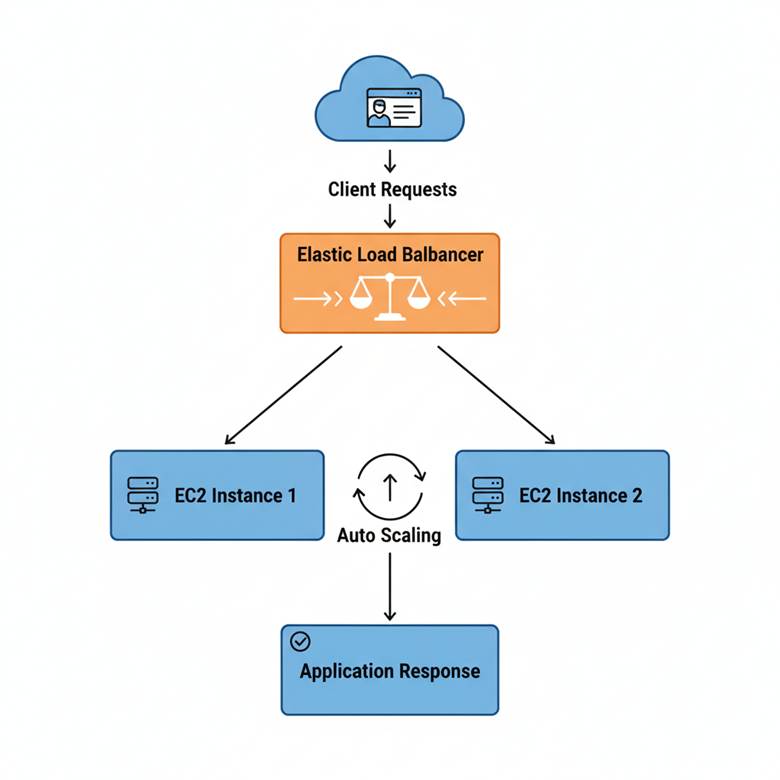
4. How ELB and Auto Scaling Work Together
Hierarchical Diagram Concept:
5. Step-by-Step: Implementing ELB with Auto Scaling
1 – Launch EC2 Instances
- Use Free Tier or small instances for practice
- Place them in multiple Availability Zones for high availability
2 – Create Security Groups
- Allow inbound traffic (HTTP/HTTPS)
- Allow internal communication for backend services
3 – Create Launch Template
- Define instance type, AMI, key pair, security group
4 – Create Auto Scaling Group
- Assign launch template
- Specify minimum, maximum, and desired number of instances
- Configure scaling policies (CPU > 70% → scale-out, CPU < 30% → scale-in)
5 – Create Application Load Balancer
- Select VPC and subnets
- Configure listeners (HTTP/HTTPS)
- Register Auto Scaling Group as target
6 – Test
- Generate traffic (e.g., via browser or load testing tools)
- Observe Auto Scaling actions and ELB request distribution
6. Best Practices for Beginners
| Practice | Reason |
| Deploy instances in multiple AZs | High availability and fault tolerance |
| Use health checks | ELB removes unhealthy instances automatically |
| Start with small-scale Auto Scaling | Prevent unnecessary costs while learning |
| Monitor CloudWatch metrics | Optimize scaling policies |
| Integrate ELB with HTTPS | Secure traffic with SSL/TLS |
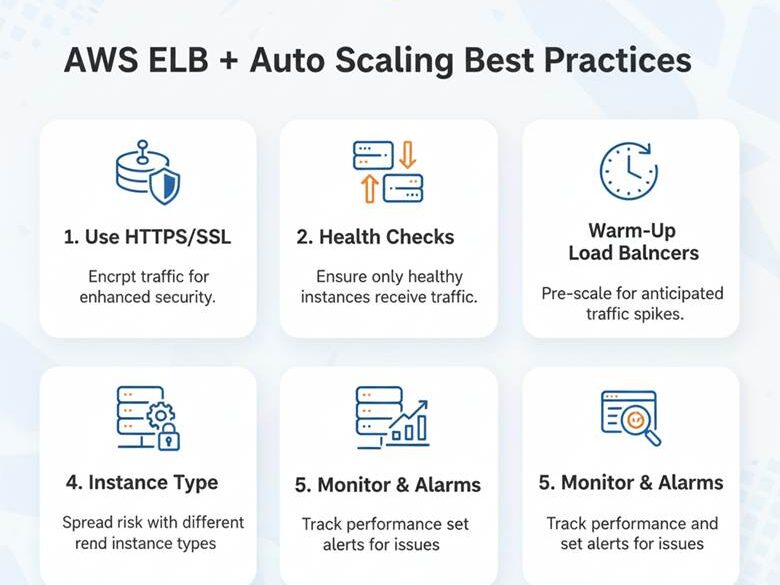
7. Infographic Concept
Visual Idea:
8. Common Beginner Mistakes
- Forgetting to configure target group health checks → ELB keeps sending traffic to unhealthy instances
- Not using multiple AZs → single point of failure
- Setting incorrect scaling thresholds → either over-scaling or under-scaling
- Ignoring security groups → blocked traffic or exposed ports
Curiosity Tech Insight: Hands-on labs simulate traffic spikes so beginners understand real-world scaling and load balancing behavior.
9. Path to Expertise
- Start by creating small ELB + ASG setups in a single region.
- Experiment with different scaling policies (CPU, network, custom metrics).
- Implement multi-AZ, multi-region architectures for production-grade apps.
- Integrate CloudWatch alarms and SNS notifications for proactive monitoring.
- Advance to blue/green deployments and ELB advanced routing features.
At CuriosityTech.in, learners progress from basic tutorials to architecting fully automated, resilient systems, gaining confidence in cloud engineering and operational excellence.
Conclusion
Elastic Load Balancing and Auto Scaling are critical tools for building resilient, scalable, and cost-efficient cloud architectures. Mastering these services ensures that applications remain performant, secure, and available even under unpredictable traffic.
Practical labs and mentorship at Curiosity Tech allow learners to see ELB and Auto Scaling in action, understand metrics, and apply best practices—essential skills for any aspiring AWS cloud engineer.