
Introduction
Identity and Access Management (IAM) is the cornerstone of secure cloud environments. Azure Active Directory (AAD) provides a centralized, cloud-based identity solution, enabling enterprises to control access to resources, applications, and sensitive data. For cloud engineers, mastering AAD is critical for security, governance, and compliance.
At curiosity tech learners explore practical labs that combine theoretical depth with hands-on exercises, preparing them to secure and manage real-world Azure environments efficiently.
1. What is Azure Active Directory (AAD)?
Definition: AAD is Microsoft’s cloud-based identity and access management service. It allows users to:
- Authenticate securely into Azure, Office 365, and other SaaS applications
- Control access to resources using Role-Based Access Control (RBAC)
- Manage devices, users, groups, and applications centrally
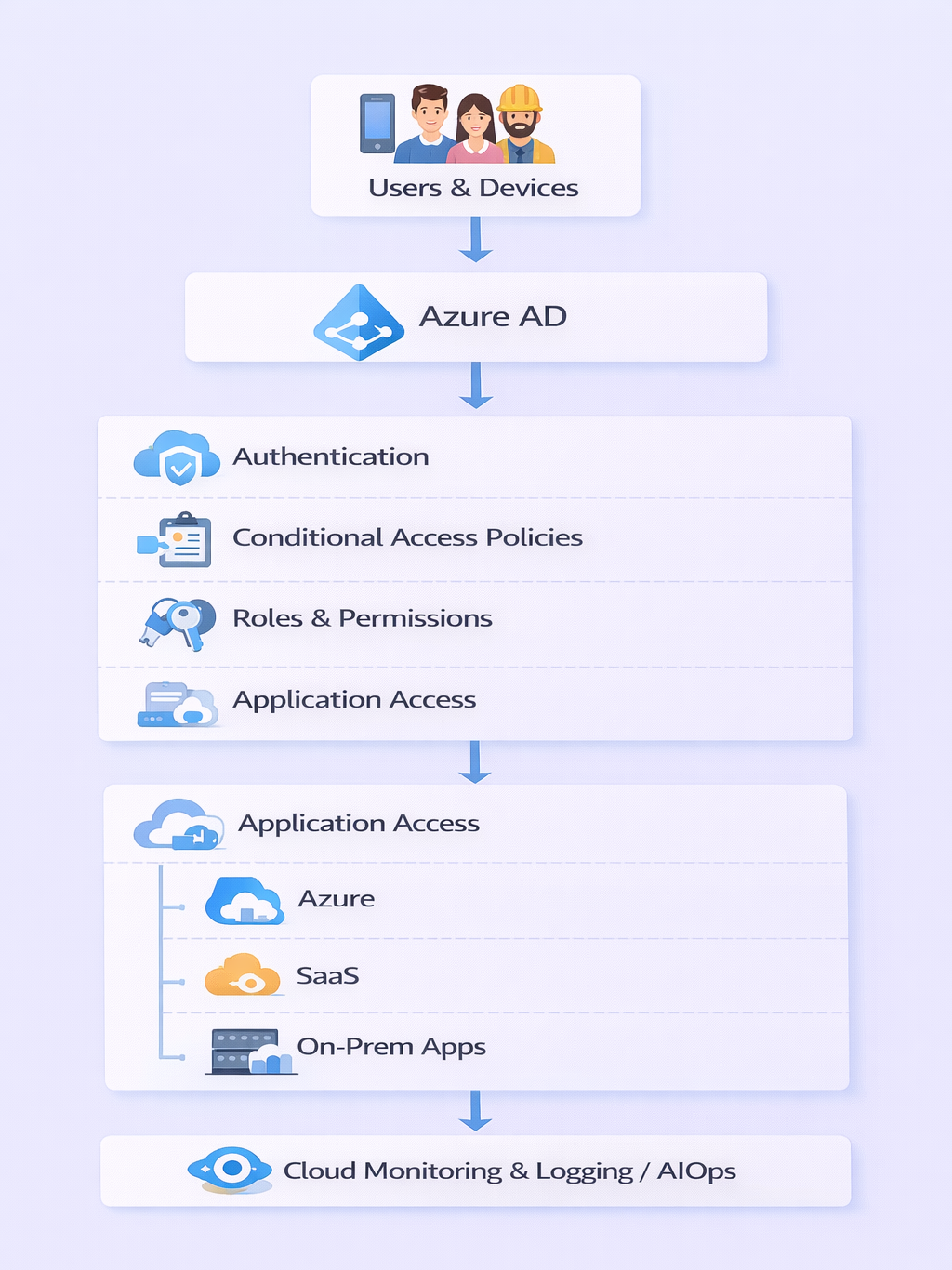
Core Components:
- Users & Groups: Represent individual accounts and logical collections
- Applications: SaaS or custom applications integrated with AAD
- Roles: Predefined or custom roles to assign permissions
- Conditional Access: Policies enforcing authentication conditions
- Identity Protection: Advanced threat detection and risk-based controls
Diagram: AAD Architecture Flow
2. Understanding Role-Based Access Control (RBAC)
RBAC allows you to assign precise permissions to users, groups, and service principals at various scopes:
| Scope | Description |
| Management Group | Applies permissions across multiple subscriptions |
| Subscription | Access control for all resources within subscription |
| Resource Group | Access control limited to specific projects/resources |
| Resource | Granular access for single resource (VM, storage) |
Common Roles:
- Owner: Full access, including managing RBAC
- Contributor: Create/manage resources but not assign roles
- Reader: View resources only
Scenario Example: In an enterprise, developers are given Contributor role on Dev Resource Groups, while QA engineers get Reader role. This ensures security and separation of duties.
3. Users, Groups, and Application Management
- Users: Employees, service accounts, or guest users
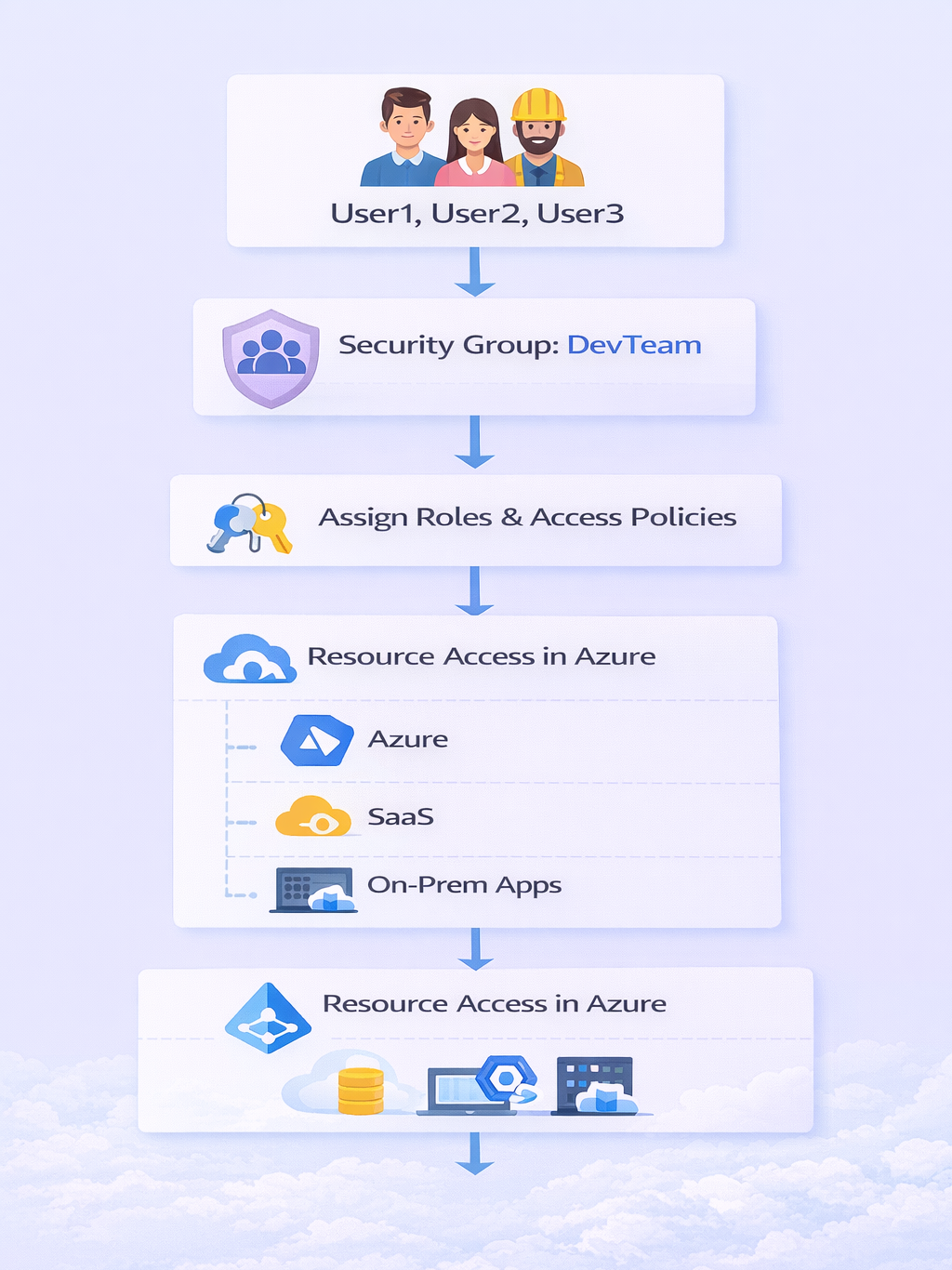
- Groups: Simplify permissions by grouping users (Security & Microsoft 365 Groups)
- Applications: Integrated via OAuth, SAML, or OpenID Connect
Practical Example: A SaaS application like Salesforce is integrated into AAD. Employees use single sign-on (SSO) to access it without separate credentials.
Diagram: User & Group Flow in AAD
4. Conditional Access Policies
Definition: Policies that enforce who, how, and from where users can access resources.
Key Conditions:
- Sign-in risk level (low, medium, high)
- Device compliance status
- Location (IP, region)
- Application sensitivity
Practical Example:
- Policy: Require MFA for all users accessing production resources outside corporate network
- Outcome: Unauthorized or risky sign-ins are blocked or challenged
Table 1: Conditional Access Policy Example
| Policy Name | Condition | Access Control | Target Users |
| MFA-Prod-External | Outside trusted network | Require MFA | All Users |
| Device-Compliance | Non-compliant devices | Block Access | All Employees |
| SSO-Application | SaaS App | Grant Access | Group: DevTeam |
5. Multi-Factor Authentication (MFA) and Security Best Practices
- MFA: Adds a second authentication layer (SMS, Authenticator App, Email)
- Identity Protection: Detects compromised accounts and risky sign-ins
- Privileged Identity Management (PIM): Provides time-bound, approval-based elevated access
Scenario: A cloud engineer needs temporary elevated access to deploy critical production VMs. Using PIM, they request activation for 1 hour, ensuring security and audit compliance.
6. Step-by-Step Hands-On Lab: Configuring AAD
- Create Users & Groups:
- Navigate to Azure Portal → Azure Active Directory → Users → New User
- Create a group: DevTeam → Add users
- Assign Roles:
- Navigate to Resource Group → Access Control (IAM) → Add Role Assignment
- Assign Contributor role to DevTeam
- Set Conditional Access Policy:
- AAD → Security → Conditional Access → New Policy
- Select All Users, Require MFA, apply to production resources
- Integrate SaaS App:
- Azure AD → Enterprise Applications → New Application
- Configure SSO using OAuth or SAML
7. Expert Tips to Become an AAD Specialist
- Use least-privilege access principle to minimize risk
- Automate user and role management using Azure CLI and PowerShell
- Monitor audit logs regularly via Azure Monitor & Log Analytics
- Explore Hybrid Identity integration with on-premises AD
- Follow curiositytech.in labs for real-world scenarios and advanced AAD configurations
Conclusion
Azure Active Directory is the heart of secure cloud identity management. By mastering RBAC, conditional access, MFA, and application integration, cloud engineers ensure that resources remain protected while enabling productivity. Platforms like curiosity tech provide the hands-on experience and scenario-based labs that accelerate expertise in identity and access management.