

Introduction
Networking is the backbone of cloud architecture. For Azure Cloud Engineers, mastering Virtual Networks (VNets), Network Security Groups (NSGs), and Load Balancers is essential to ensure secure, scalable, and highly available applications.
At curiosity tech, learners are trained to design enterprise-grade cloud networks, combining theoretical understanding with practical implementation. This blog provides extreme detail, use cases, diagrams, and tips to become an Azure networking expert.
1. Understanding Azure Virtual Networks (VNets)
Definition: A Virtual Network (VNet) is an isolated network within Azure, allowing you to securely connect Azure resources like VMs, databases, and app services.
Key Concepts:
- Subnets: Logical partitions within a VNet to organize resources
- Address Space: CIDR-based IP ranges assigned to a VNet
- Peering: Connects VNets for cross-region communication
- DNS: Custom or Azure-provided DNS for name resolution
Practical Example: You deploy two VNets:
- VNet-Dev for development VMs
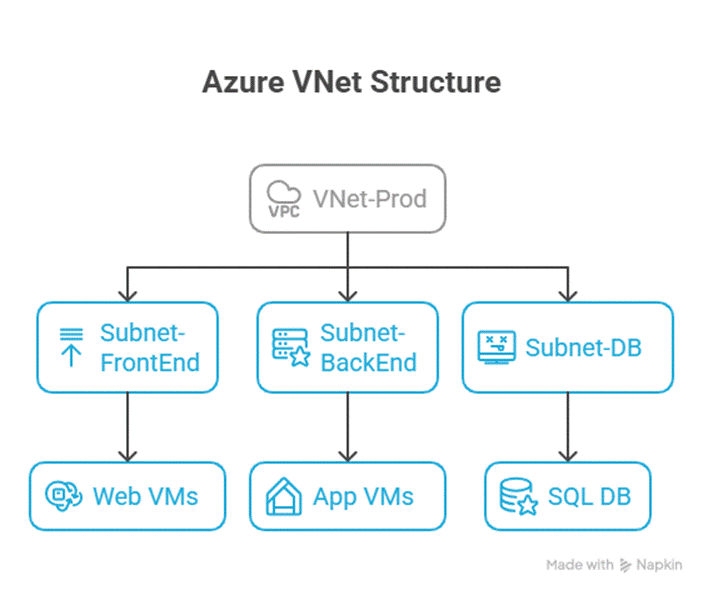
- VNet-Prod for production VMs :- By peering VNets, developers can access required services without exposing resources to the public internet.
Diagram: VNet Structure
2. Network Security Groups (NSGs)
Definition :- NSGs act as firewalls at the subnet or NIC level, controlling inbound and outbound traffic using security rules.
Key Features:
- Inbound/Outbound Rules: Define which IP ranges and ports are allowed or denied
- Priority: Rules are processed based on numerical priority (lower numbers first)
- Default Rules: Azure provides default allow/deny rules; custom rules override them
Common NSG Rules for a Web Application Scenario :
| Rule Name | Direction | Source | Destination | Protocol | Port | Action | Priority |
| Allow-HTTP | Inbound | Any | FrontEnd | TCP | 80 | Allow | 100 |
| Allow-HTTPS | Inbound | Any | FrontEnd | TCP | 443 | Allow | 200 |
| Deny-SSH | Inbound | Any | BackEnd | TCP | 22 | Deny | 300 |
| Allow-AppServer | Outbound | BackEnd | DBSubnet | TCP | 1433 | Allow | 400 |
Scenario :- A production web server in Subnet-FrontEnd can serve HTTP/HTTPS traffic but cannot initiate SSH connections from the public internet. Meanwhile, backend app servers communicate only with the database subnet.
3. Azure Load Balancers
Definition :- Load Balancers distribute traffic across multiple resources, ensuring high availability and performance.
Types:
- Public Load Balancer: Distributes incoming internet traffic
- Internal Load Balancer: Distributes traffic inside a VNet
Key Features:
- Health Probes: Monitor VM availability
- Inbound NAT Rules: Map external ports to internal VMs
- Session Persistence: Maintain sticky sessions if needed
Practical Example: A web app running on three VMs uses a Public Load Balancer. Users accessing the app are evenly distributed across all three VMs, ensuring no single server is overwhelmed. Health probes detect if a VM is down, and traffic is rerouted automatically.
Diagram: Load Balancer Architecture

4. Step-by-Step Hands-On Networking Setup
- Create a VNet:
- az network vnet create \
- –name VNet-Prod \
- –resource-group RG-Network-Dev \
- –address-prefix 10.0.0.0/16 \
- –subnet-name Subnet-FrontEnd \
- –subnet-prefix 10.0.1.0/24
- Create NSG and Rules:
- az network nsg create –resource-group RG-Network-Dev –name NSG-FrontEnd
- az network nsg rule create –resource-group RG-Network-Dev –nsg-name NSG-FrontEnd \
- –name Allow-HTTP –priority 100 –direction Inbound –protocol Tcp –destination-port-range 80 –access Allow
- Deploy Load Balancer:
- Select Public Load Balancer
- Configure Frontend IP, Backend Pool, Health Probes, and Load Balancing Rules
5. Best Practices for Networking Experts
- Subnet Segmentation: Separate VMs, databases, and management endpoints
- NSG Hierarchy: Apply NSGs at subnet level for global rules and NIC level for specific VM rules
- Load Balancer Design: Use health probes and redundancy for fault tolerance
- VNet Peering: Avoid unnecessary internet exposure by using VNet peering for internal communication
- Monitor Traffic: Leverage Azure Network Watcher for insights and diagnostics
Conclusion
Azure networking forms the critical foundation of secure, scalable cloud environments. Understanding VNets, NSGs, and Load Balancers allows engineers to design enterprise-grade architectures, control access, and ensure high availability. By following scenario-based examples and hands-on labs at curiosity tech, learners can accelerate their journey to becoming Azure networking experts.