Abstract
Databases are the foundation of every digital ecosystem, yet in a multi-cloud environment, database management introduces complexities around latency, consistency, scalability, and vendor dependency. This paper examines the SQL, NoSQL, and cloud-native database options across AWS, Azure, and GCP, providing a comparative analysis of their suitability for different enterprise workloads. Drawing from 20 years of enterprise experience and training insights from Curiosity Tech
, this research illustrates practical deployment strategies, common pitfalls, and pathways for engineers aiming to become multi-cloud database experts.
Introduction
When enterprises adopt multi-cloud, database decisions become strategic rather than purely technical. It’s no longer about choosing MySQL vs PostgreSQL—it’s about balancing compliance, latency, availability, and cost across providers.
Consider this scenario:
- Customer data lives in AWS RDS (SQL).
- IoT data streams enter Azure Cosmos DB (NoSQL).
- Real-time analytics run on Google BigQuery (cloud-native).
This is the reality of modern enterprises. At CuriosityTech.in, we teach learners how to design such distributed architectures while ensuring data integrity, performance, and governance across clouds.
Methodology for Multi-Cloud Database Evaluation
To evaluate database options, they are measured against five critical criteria:
- Scalability (vertical and horizontal)
- Consistency Models (ACID vs BASE)
- Cost Efficiency (compute, storage, network)
- Integration with cloud-native services
- Compliance & Security (encryption, regional laws)
Section 1 – SQL Databases in Multi-Cloud
Relational databases remain the foundation of transaction-heavy systems such as banking, ERP, and e-commerce.
Options Across Clouds:
- AWS: Amazon RDS (MySQL, PostgreSQL, Oracle, SQL Server), Aurora
- Azure: Azure SQL Database, SQL Managed Instance
- GCP: Cloud SQL (MySQL, PostgreSQL, SQL Server)
Key Insights:
- AWS Aurora enables auto-scaling with distributed clusters.
- Azure SQL integrates deeply with Active Directory and Power BI.
- GCP Cloud SQL is easy to use but lacks some enterprise capabilities offered by Aurora or SQL Managed Instance.
SQL Multi-Cloud Comparison Table:
| Feature | AWS Aurora / RDS | Azure SQL DB | GCP Cloud SQL |
|---|---|---|---|
| Engine Options | MySQL, Postgres, Oracle, SQL Server | SQL Server, PostgreSQL, MySQL | MySQL, Postgres, SQL Server |
| Scalability | Aurora Auto-Scaling | Elastic Pools | Regional scaling |
| HA & DR | Multi-AZ, Global DB | Zone Redundant, Geo-replication | Cross-region failover |
| Security | IAM, KMS, Audit Logs | AD Integration, TDE | CMEK, IAM policies |
Section 2 – NoSQL Databases in Multi-Cloud
For applications requiring large scale, flexibility, and rapid write throughput (IoT, mobile, real-time apps), NoSQL is preferred.
Options Across Clouds:
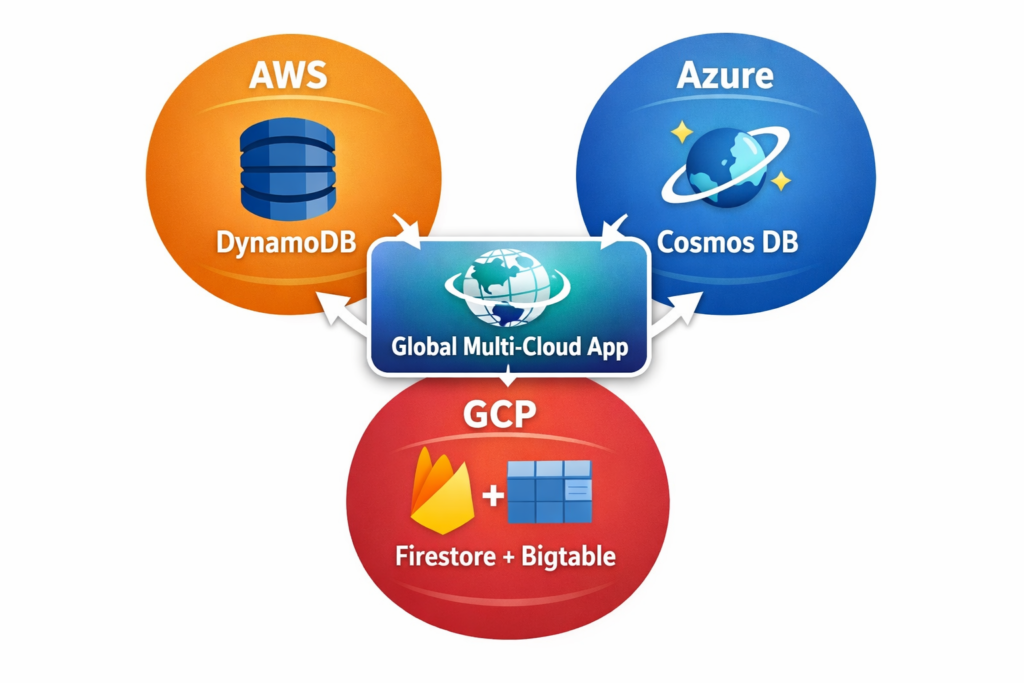
- AWS DynamoDB: Key-value + document
- Azure Cosmos DB: Multi-model (key-value, graph, columnar, document)
- GCP: Firestore & Bigtable
Key Insights:
- DynamoDB excels at ultra-low latency and global replication.
- Cosmos DB offers unmatched multi-model capabilities.
- Bigtable is ideal for time-series and analytical workloads.
Diagram (Described):
Section 3 – Cloud-Native Databases
Cloud-native databases are optimized for elasticity, global scale, and serverless execution.
Options Across Clouds:
- AWS Aurora Serverless
- Azure Cosmos DB (serverless)
- GCP BigQuery
Use Case Fit:
- Aurora Serverless → unpredictable SQL workloads
- Cosmos DB → globally distributed microservices
- BigQuery → analytics, ML workloads
Case Example:
A retail enterprise migrated on-prem Oracle to BigQuery. Query times dropped from 30 minutes to under 1 minute, with Looker Studio enabling real-time dashboards.
At CuriosityTech.in, learners simulate similar data pipelines using real datasets.
Section 4 – Challenges in Multi-Cloud Database Management
- Data Consistency: ACID vs BASE
- Latency: Cross-cloud replication delays
- Data Gravity: Large datasets are difficult to move
- Cost: Egress fees can become excessive
- Skill Gaps: Engineers often know one platform, not all three
Section 5 – Pathway to Becoming a Multi-Cloud Database Expert
- Master one SQL engine: MySQL or PostgreSQL
- Learn NoSQL: DynamoDB & Cosmos DB
- Understand cloud-native systems: BigQuery, Aurora Serverless
- Practice migration: Move dataset AWS RDS → BigQuery
- Study compliance: encryption, data residency, sharding
- Earn certifications: AWS Database Specialty, Azure Data Engineer, GCP Data Engineer
At Curiosity Tech, students progress from simple database deployments to designing full multi-region, multi-cloud enterprise architectures.
Conclusion
In the multi-cloud era, databases are no longer just storage systems—they are strategic components of distributed architecture. SQL ensures consistency, NoSQL provides flexibility, and cloud-native solutions add speed and scale.
Enterprises succeed when they combine all three intelligently, balancing cost, compliance, and performance. For engineers, multi-cloud database expertise has become essential for building future-proof systems.
At CuriosityTech.in, we turn this knowledge into hands-on, practical learning—so learners design, deploy, and optimize real multi-cloud database architectures.